
A 2015 WhatsApp update story said Google Drive chat backup had been removed. That is a historical report and should not be used as current instructions: WhatsApp’s Help Center now documents Android chat backups using a Google Account, alongside a direct chat-transfer option. WhatsApp can change screens and feature availability, so check the current in-app labels and official help pages for your version.

Block or report unwanted messages
If an unknown number sends spam or suspicious content, open the chat and use WhatsApp’s current block or report controls. Reporting helps WhatsApp review the account or message; blocking stops future messages, calls, and status updates from that sender. Do not open links, download unexpected files, share a one-time registration code, or send money because a message creates urgency. If a message appears to come from someone you know, verify it through another channel: their account may have been compromised.
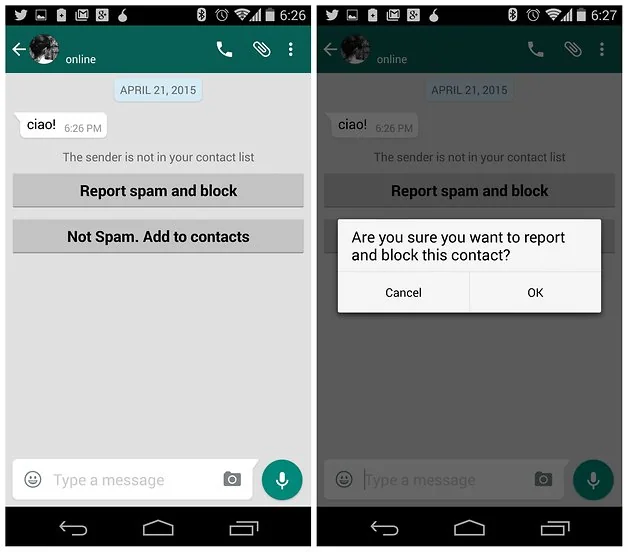
On WhatsApp versions where the controls appear in the contact or chat menu, select the sender and choose Block or Report, following the confirmation prompt. The exact menu location can vary by Android version and WhatsApp release. Save evidence only when needed for your safety or a formal report, and avoid forwarding harmful content to others.
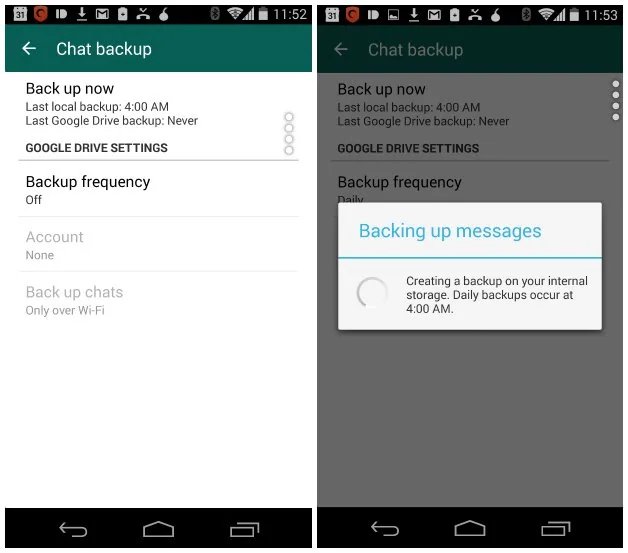
Back up chats on Android
Open WhatsApp and go to Settings, Chats, then Chat backup; the names or positions of these options can vary slightly. Choose the Google Account and backup frequency that suit you, connect to a reliable Wi-Fi network for a large upload, and review whether videos should be included because they can use substantial storage. Keep access to the Google Account used for the backup. A backup stored in a cloud account is separate from the messages currently on your phone, so verify the last successful backup time before switching or resetting devices.

Consider end-to-end encrypted backups
WhatsApp offers an optional end-to-end encrypted backup feature. If you enable it, follow WhatsApp’s current setup flow and protect the backup with the offered password or encryption key. Store that secret securely and separately from the phone. WhatsApp’s help documentation explains that it cannot retrieve a forgotten backup password or key for you; losing it can prevent restoration of that encrypted backup. Do not send the key to support agents or store it in a public note.

Transfer chats to another Android phone
WhatsApp also documents a chat-transfer feature for moving chat and media history directly between Android phones. Review the current prerequisites on the Help Center page, keep both phones nearby and powered, and do not erase or trade in the old phone until you have checked the transfer or restore on the new one. A text export is useful as a record but cannot be imported back into WhatsApp as a chat backup.
Spam controls, backup choices, and transfer steps are different features. Use WhatsApp’s official Help Center for the current version, and never install a modified WhatsApp build or a third-party “backup remover” to recover chats.

