
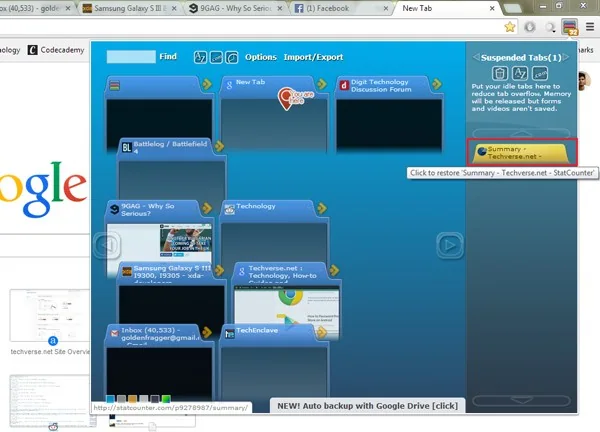
TooManyTabs was a Chrome extension presented in 2014 as a way to manage a crowded browser window. The underlying problem remains familiar: many open tabs make it harder to find a page, consume memory and create visual clutter. Extension interfaces and Chrome’s own tab features have changed substantially since then, so this article is a historical review rather than a claim that the old extension is still available or maintained.
Why tab managers appealed
A tab manager can help users locate pages by title, search open tabs or temporarily set aside work. The value is organizational: instead of scanning a long strip of tiny favicons, the user sees a more readable list. Some tools also suspend inactive pages, though behavior depends on the browser and extensions currently installed.
Any extension that can read or change website data deserves careful review. Permission wording can grant access across sites, and an extension’s ownership or privacy policy may change. Before installing a tab tool, check whether it is available in the official Chrome Web Store, who publishes it, when it was last updated and what permissions it requests. If a listing is unavailable or abandoned, avoid downloading an old extension package from a third-party mirror.
Current built-in options
Chrome includes built-in ways to search tabs and group related pages, although exact controls can vary by release and operating system. Browser settings also provide tools for managing performance and memory. Use the current Chrome help pages for the latest steps rather than following an old interface walkthrough.
A simpler browsing routine
Close tabs that are no longer useful, bookmark references that need to be kept and use named groups for a small set of active projects. Keep fewer extensions installed, since each one adds code and potentially broad access to browsing activity. Review extension permissions after updates and remove anything that is no longer needed.
TooManyTabs illustrates an early solution to a lasting browser problem. For present-day users, choose maintained tools with narrow permissions or use Chrome’s built-in controls. The old extension’s current compatibility, publisher and privacy practices should be verified directly before anyone considers installing it.

