
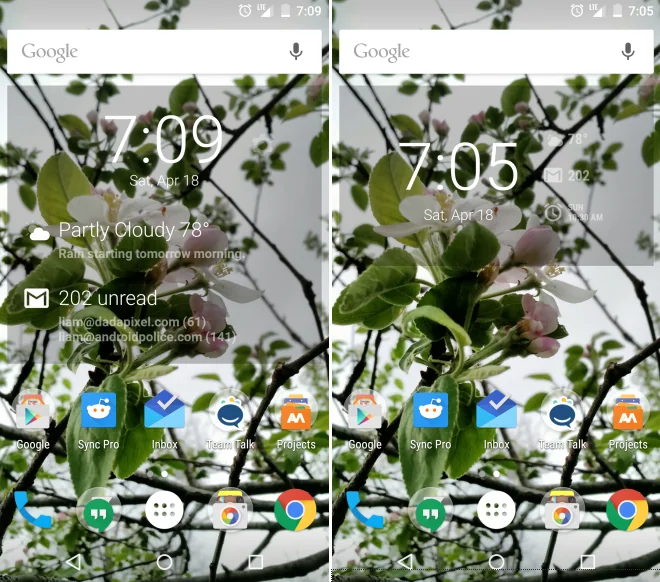
DashClock Widget was an Android home-screen and lock-screen widget created by Google designer Roman Nurik. Introduced in the Android 4.2 era, it brought a large clock together with compact status extensions such as weather, unread messages and calendar information. Its appeal came from letting users see useful details without opening several separate apps.
What made DashClock different
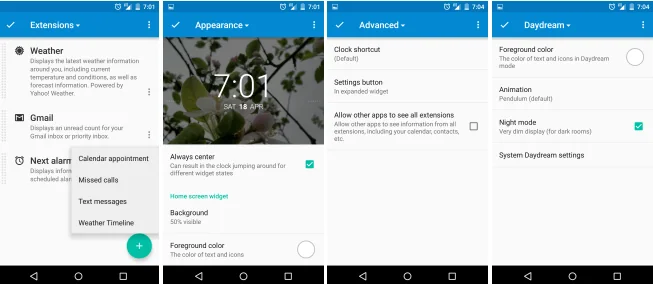
The widget used an extension model: developers could add small sources of information that appeared alongside the clock. That made the interface adaptable while keeping the default layout relatively simple. At a time when Android allowed substantial home-screen customization, DashClock demonstrated how a single widget could act as a glanceable dashboard.
The design depended on Android APIs and lock-screen behavior that changed over time. Later Android releases altered lock-screen widgets and notification access, and app compatibility can vary by device. Old APK files can be modified, unsigned or bundled with unwanted software. Installing an archived copy from an unfamiliar website is not a safe way to recover a discontinued feature.
How Android customization evolved
Current Android devices provide their own lock-screen controls, widgets and notification settings, with details varying by manufacturer and release. Users should review which information is visible while the phone is locked. Messages, calendar entries and account alerts can expose private details to anyone who can see the display. Hide sensitive notification content if the device is shared or used in public.
Third-party widgets and launchers may request access to notifications, contacts or other personal data. Check the developer, permission list, privacy disclosures and maintenance history before installing one. Prefer current software from trusted stores and remove components that no longer receive updates.
Why the project is still remembered
DashClock reflected an era when users could reshape Android’s home and lock screens with extensions. It is best understood as a design milestone, not as a current download recommendation. Its history shows the trade-off between convenience and privacy: glanceable information is useful, but the lock screen should reveal only what the owner intends.

