
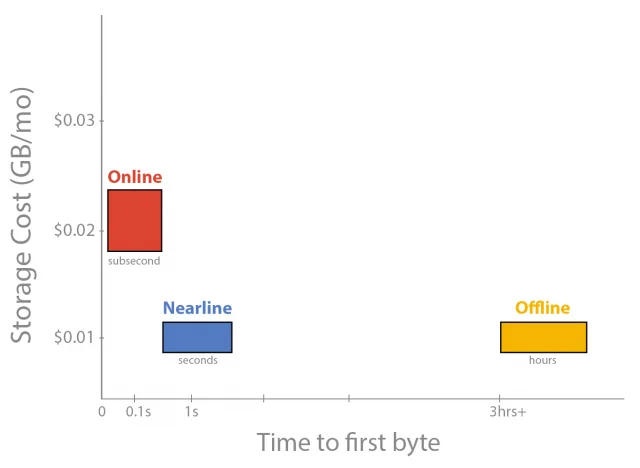
Google introduced Cloud Storage Nearline in 2015 as a lower-cost option for data that organizations expected to access infrequently but still needed to retrieve online. It sat between frequently accessed storage and offline archival systems: customers could store large datasets at a lower monthly rate while accepting a retrieval charge and a short delay before data became available.
What Nearline was designed for
Nearline targeted use cases such as backups, disaster recovery, media archives and analytics datasets that were rarely read but could not be kept completely offline. It used Google’s cloud infrastructure and a storage-class model in which the price depended on how often data was accessed. The trade-off was important: a low storage rate did not mean every read or operation was free.

Cloud storage bills can include storage capacity, operations, network egress, retrieval and minimum storage-duration charges. Organizations should estimate the full pattern of writes, reads and transfers before choosing a class. A tier that fits a monthly backup may be expensive for a dataset queried every day. Lifecycle rules can move objects between classes, but those policies should be tested to avoid unexpected charges or premature deletion.
How the service evolved
Google later reorganized and renamed parts of its Cloud Storage class lineup. Nearline is now presented within a broader set of storage classes, and current pricing, availability and performance terms may differ from the 2015 announcement. Historical names in old articles should not be treated as current product instructions. Check Google Cloud’s current documentation for the supported classes and region-specific rates.
Choosing a storage class today
Start with recovery objectives: how quickly must data be restored, how often will it be read, and how long must it be retained? Then compare storage, retrieval and network charges using current price calculators. Encrypt sensitive data, apply access controls and test restoration procedures. A backup is useful only if it can be restored reliably.
Nearline’s launch illustrates how cloud providers created tiers for data with different access patterns. The underlying planning lesson remains useful: balance storage cost against retrieval frequency, recovery speed and data-protection needs, using current product terms rather than old launch prices.

