
People often say an account was “hacked,” but account takeovers usually begin with a specific weakness: a reused or exposed password, a convincing phishing message, a compromised device, or recovery details that an attacker can control. You cannot prevent every attack, but you can make unauthorized sign-in harder and improve your chances of noticing it quickly.

Use a unique password and multifactor sign-in
Give every important account a different, long password. A password manager can generate and store unique passwords so one breach does not expose the same credential on several services. Turn on multifactor authentication (MFA) wherever it is offered. MFA asks for another proof of identity in addition to the password. Prefer an authenticator app, passkey or security key when the service supports it; text-message codes can still add protection compared with a password alone, but do not share any code with someone who contacts you.
Recognize attempts to steal credentials
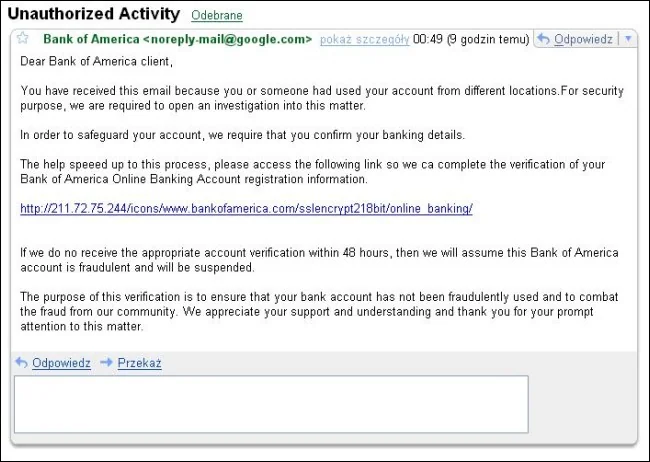
Phishing messages may imitate a service, employer, delivery company or person you know. Be cautious with urgent warnings, unexpected attachments, links asking you to sign in, and offers that seem unusually good. Instead of following a message link, open the service using its official app or type its known address yourself. Never enter a password or verification code into a page reached from an unexpected message. CISA recommends recognizing and reporting phishing, using strong passwords and enabling MFA as core account-safety steps.
Review account activity and recovery options
Use the service’s security page to review recent sign-ins, devices, connected apps, recovery email and phone number, and forwarding or delegation settings where available. Remove sessions and apps you do not recognize. Keep recovery information current and protect the email account used to reset other passwords. Security alerts should be reviewed through the service’s official app or website; a legitimate alert should not require you to disclose your password or one-time code to a caller.
If you suspect a takeover
From a device you trust, go directly to the provider’s official account-recovery process. Change the affected password and any reused passwords, revoke unknown sessions, remove unfamiliar recovery methods or connected apps, and enable MFA. Check whether attackers changed email forwarding, payment details, profile information or messages sent from the account. Warn contacts if the account sent suspicious messages. Google’s recovery guidance recommends securing the account, changing compromised credentials and checking unfamiliar devices; other providers offer similar official recovery flows.
Security tools and menus differ by service, so use its current help page for exact steps. Be skeptical of third-party “recovery experts” who ask for payment, passwords or verification codes. No checklist guarantees that an account can never be compromised, but unique credentials, MFA, careful link handling and prompt review reduce common takeover paths.

