
WebP is an image format for photographs, illustrations, and web graphics. It supports lossy and lossless compression, transparency, and animation. A smaller file can reduce page transfer size, but the best format depends on the source image, visual quality, browser support, and how a site serves its media.

Choose lossy or lossless compression
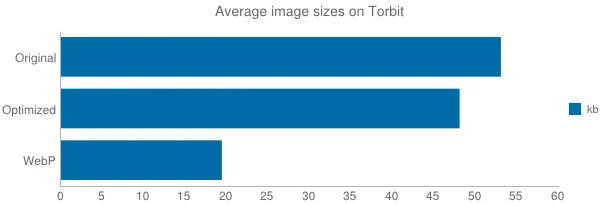
Lossy WebP discards some image information to reduce file size; the quality setting controls that trade-off. It is often suitable for photographs when the result still looks clean at the size visitors see. Lossless WebP preserves pixel values and is useful for graphics where crisp edges or exact colors matter. Google’s WebP FAQ describes both methods and reports typical size reductions from its studies, but the result varies by image.
Inspect the image after conversion
Do not judge conversion by file size alone. Compare the converted file at its intended display dimensions and check fine text, gradients, transparent edges, and skin tones. A repeated conversion from an already compressed JPEG can make artifacts more visible. Keep the original until the new file has been checked and the site’s backup or source library is safe.
Consider animation and transparency
WebP can store transparency and animation, which can make it an alternative to PNG or GIF in some workflows. Animated images may behave differently in older software, editing tools, or content systems, so test the file where it will be published. Preserve transparency when converting logos and icons; a flattened background can make them look wrong against a page.
Check delivery and fallbacks
Modern browsers widely support WebP, but a publishing pipeline should still verify that media URLs return the expected content type and that thumbnails, social previews, and downloads work. Some sites use content negotiation or a picture element to provide a fallback format. After changing formats, test representative pages on desktop and mobile, inspect image dimensions and alt text, and avoid converting every asset automatically without visual review.

