
When a Google streaming device is idle, Ambient screensaver can display selected photos, artwork and other information. The controls depend on the hardware: older Chromecast and Chromecast Ultra devices use the Google Home app, while Chromecast with Google TV and Google TV Streamer can manage many settings on the TV itself. Menu labels and supported sources can change, so use the path for your exact device.

Open Ambient settings
For Chromecast or Chromecast Ultra, open the Google Home app, select the home and device, touch and hold the device tile, open Settings and choose Ambient mode. For Chromecast with Google TV or Google TV Streamer, open Settings on the TV and go to System, then Ambient mode. Make sure the streaming device is linked to the Google Account whose photos you intend to show.

Select photos carefully
Choose Google Photos and select the album or albums you want displayed. Check the album on another device before selecting it: photos of children, home interiors, travel plans or documents may appear on a shared television. Avoid selecting your entire library if you want a curated screen. Google notes that archived photos are not displayed in Ambient screensaver even if they belong to a selected album. Some automatic family-photo features have regional availability limits.

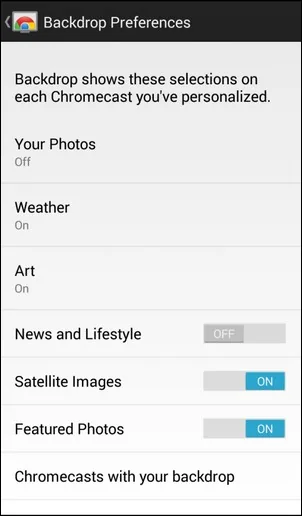
You can also choose artwork or other available sources, adjust time and weather information, and change display preferences supported by your device. Some settings, such as hiding personal photo details, may be available in the device’s Ambient or Photo Frame settings. If your choices do not appear, confirm they are associated with the correct Chromecast, restart the streaming device and check that the app and firmware are current.
Remove your photos before selling or giving away a device
Changing the selected album is not the same as removing the Google Account from the device. If you are transferring ownership, use the device’s factory-reset process and confirm that it has returned to its setup screen. Google says Ambient preferences are removed when the device is factory reset. Also review which accounts are signed in and remove the device from your account if the setup flow or account page provides that option.
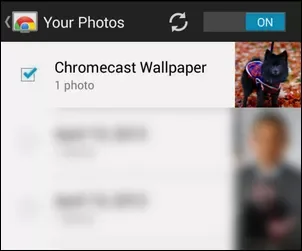
Ambient screensaver cannot necessarily be disabled entirely; Google may show featured photos when no custom source is selected. If you do not want personal images on the TV, remove Google Photos from the selected sources or use a non-personal source.

